Lesen und Beschreiben des Flash Programmspeichers
Über SPI lässt sich sowohl das eingebaute EEPROM als auch der Programmspeicher (FLASH) beschreiben. Die Befehle dazu sind sind im Datenblatt beschrieben. Im Folgenden versuchen wir den FLASH zu beschreiben. Auf diese Weise wird dann in den folgenden Kapiteln auch das Programm übertragen.
Der Flash Speicher
Der 1K Byte FLASH des ATtiny13A ist unterteilt in 512 Speicherbereiche zu je 2 Byte. Die zusammengehörenden 2 Byte nennt man "Word". In einem Word lassen sich dann die 16 Bit Instructions (Machinecode-Befehle) der AVR Mikrocontroller speichern. Die 512 Speicheradressen lassen sich von 0-511 (0x00 -0x01FF) auswählen.
Das Programmieren des FLASH erfolgt lt. Datenblatt Pageweise. Je 16 Words werden zu einer "Page" zusammengefasst. Zuerst werden die 16 Words auf den ATtiny in einen Buffer geladen und dann mit einem anschließenden Write-Befehl zusammen in den FLASH übertragen (32 Pages je 16 Words mit jeweils 2 Byte)
Schreiben in eine Speicheradresse
Mit der Funktion loadWordToBuffer() wird ein Word (2 Byte) an einer bestimmten Stelle in ein
Buffer auf dem ATtiny geladen (0-15). Der gesamte Buffer wird anschließend mit der Funktion
writeBufferToFlash() in den Flash Programmspeicher geschrieben.
void loadWordToBuffer(byte pos, word data) {
	//  Loading a Word to the ATtiny Buffer
	//  pos = position of the word in the Page (0-15)
	//  data = 16 bit of Data (1 word) */

	// Instruction to load the Low Byte of the Word to the buffer
	SPI.transfer(0b01000000);
	SPI.transfer(0b00000000);
	SPI.transfer(pos);
	SPI.transfer(data);

	// Instruction to load the High Byte of the Word to the buffer
	SPI.transfer(0b01001000);
	SPI.transfer(0b00000000);
	SPI.transfer(pos);
	SPI.transfer(data >> 8);
	delay(1);
  }
void writeBufferToFlash(byte pageAdr) {
	// Writing to prior loaded Buffer in page size to the FLASH
	// pageAdr = page adress to store the 16 words of the buffer (0-31)  */

	SPI.transfer(0b01001100);
	SPI.transfer(pageAdr >> 4);
	SPI.transfer(pageAdr << 4);
	SPI.transfer(0b00000000);
	delay(5);
  }
Lesen einer Speicheradresse
Mit der Funktion readFlashMemory() lässt sich eine Speicheradresse (0-511) auslesen. Der
Rückgabewert der Funktion ist das bei der Adresse gespeicherte Word (16 Bit).
word readFlashMemory(int wordAdr) {
	// Reading a 16 bit word (one Instruction) from the FLASH
	// wordAdr = word address (0-511) */

	// Instruction to read the Low Byte of the word
	SPI.transfer(0b00100000);
	SPI.transfer(wordAdr >> 8);
	SPI.transfer(wordAdr);
	byte lb = SPI.transfer(0x00);

	// Instruction to read the High Byte of the word
	SPI.transfer(0b00101000);
	SPI.transfer(wordAdr >> 8);
	SPI.transfer(wordAdr);
	byte hb = SPI.transfer(0x00);

	return (hb << 8) | lb;
  }
Programmcode
Folgendes Programm basiert auf dem Programm zu Auslesen der Signature Bytes. Ergänzt durch die drei oben gezeigten Funktionen und einen Abschnitt mit einem Löschbefehl des kompletten Flash-Speichers.
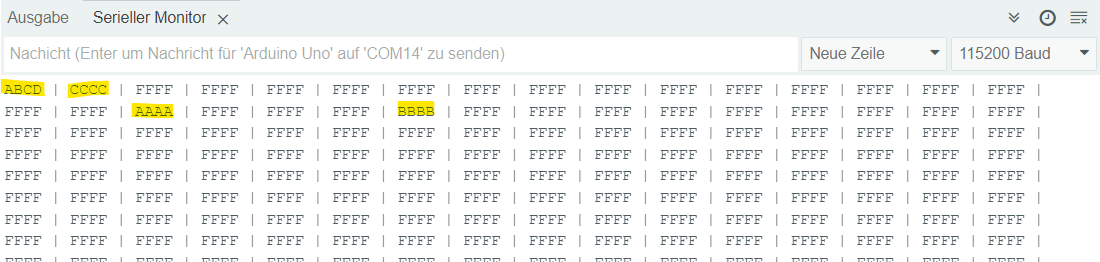
Versuchsweise wird die Flash-Speicheradresse 0, 1, 18 und 22 beschrieben. Anschließend wird zur Überprüfung der Funktionsweise der komplette Programmspeicherinhalt auf dem seriellen Monitor ausgegeben.
Info: Bei gelöschten Speicheradressen sind alle bits auf '1' gesetzt (0xFFFF).
Komplettes Programm
#include
#define CS 10

void setup() {
  Serial.begin(115200);

  pinMode(CS, OUTPUT);
  SPI.begin();
  SPI.beginTransaction(SPISettings(125000, MSBFIRST, SPI_MODE0));

  // Start Programming
  digitalWrite(CS, LOW);
  delay(5);
  digitalWrite(CS, HIGH);  // Kurzer RESET Impuls lt. Datenblatt
  delay(1);
  digitalWrite(CS, LOW);
  delay(20);  // Wartezeit lt. Datenblatt

  // Instruction 'Programming Enable'
  SPI.transfer(0b10101100);
  SPI.transfer(0b01010011);
  SPI.transfer(0b00000000);
  SPI.transfer(0b00000000);
  delay(10);

  // Instruction 'Chip Erase'
  SPI.transfer(0b10101100);
  SPI.transfer(0b10000000);
  SPI.transfer(0b00000000);
  SPI.transfer(0b00000000);
  delay(10);

  // Versuchsweises Schreiben in die Speicheradressen 0, 1, 18,22
  loadWordToBuffer(0, 0xABCD);
  loadWordToBuffer(1, 0xCCCC);
  writeBufferToFlash(0);
  loadWordToBuffer(2, 0xAAAA);
  loadWordToBuffer(6, 0xBBBB);
  writeBufferToFlash(1);

  // Anzeigen des kompletten Flash Speichers und Pageweise (in Zeilen) Darstellung
  for (int a = 0; a < 512; a++) {
	Serial.print(readFlashMemory(a), HEX);
	Serial.print(" | ");
	if (a % 16 == 15 ) {
	  Serial.println();
	}
  }

  // Stop Programming
  delay(5);
  digitalWrite(CS, HIGH);
}

void loop() {

}


void loadWordToBuffer(byte pos, word data) {
  // Loading a Word to the ATtiny Buffer
  // pos = position of the word in the Page (0-15)
  // data = 16 bit of Data (1 word) */

   // Instruction to load the Low Byte of the Word to the buffer
  SPI.transfer(0b01000000);
  SPI.transfer(0b00000000);
  SPI.transfer(pos);
  SPI.transfer(data);

  // Instruction to load the High Byte of the Word to the buffer
  SPI.transfer(0b01001000);
  SPI.transfer(0b00000000);
  SPI.transfer(pos);
  SPI.transfer(data >> 8);
  delay(1);
}


void writeBufferToFlash(byte pageAdr) {
  // Writing to prior loaded Buffer in page size to the FLASH
  // pageAdr = page address to store the 16 words of the buffer (0-31) */

  SPI.transfer(0b01001100);
  SPI.transfer(pageAdr >> 4);
  SPI.transfer(pageAdr << 4);
  SPI.transfer(0b00000000);
  delay(5);
}


word readFlashMemory(int wordAdr) {
  // Reading a 16 bit word (one Instruction) from the FLASH
  // wordAdr = word address (0-511) */

  // Instruction to read the Low Byte of the word
  SPI.transfer(0b00100000);
  SPI.transfer(wordAdr >> 8);
  SPI.transfer(wordAdr);
  byte lb = SPI.transfer(0x00);

  // Instruction to read the High Byte of the word
  SPI.transfer(0b00101000);
  SPI.transfer(wordAdr >> 8);
  SPI.transfer(wordAdr);
  byte hb = SPI.transfer(0x00);

  return (hb << 8) | lb;
}
Nach dem nun das Speichern des Programmcodes auf dem FLASH funktioniert, wird im folgenden Kapitel ein erstes sehr einfaches Programm entwickelt und auf den ATtiny übertragen.